Flexium.AI
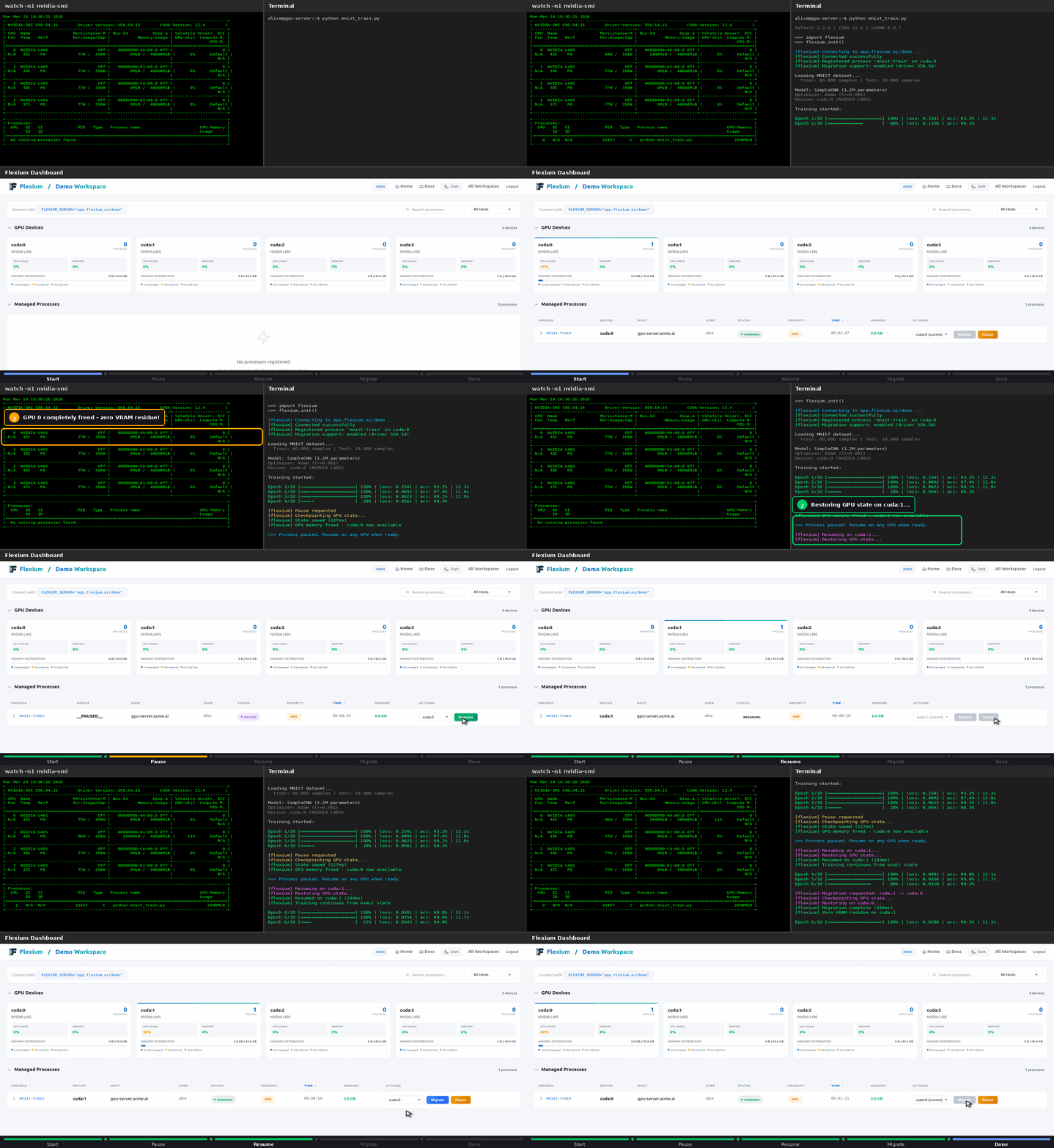
Flexible Resource Allocation - Seamlessly migrate PyTorch training between GPUs with zero interruption. Your model continues from exactly where it left off, and the source GPU is completely freed with zero VRAM residue.
Become a Design Partner
We're looking for design partners to explore advanced capabilities:
- Automatic migration based on resource optimization
- Distributed training support (DDP/FSDP)
- Integration with job schedulers (Slurm/Kubernetes)
- Multi-node GPU orchestration
If you're managing multi-GPU servers and want to shape the future of GPU orchestration, we'd love to hear from you!
-
Quick Start
Get up and running in 5 minutes with just 2 lines of code.
-
Architecture
Understand how flexium guarantees zero memory residue.
-
API Reference
Complete documentation of all public APIs.
-
Examples
Working examples from simple to production-ready.
-
Dashboard
Monitor jobs and migrate GPUs with one click.
What is Flexium?
Flexium is a GPU orchestration system that enables dynamic device migration for PyTorch training jobs. It allows training processes to be moved between GPUs without leaving any memory traces on the source device.
Key Features
- Seamless Migration: Training continues from the exact point where it left off. No progress lost
- Zero VRAM Residue: When you migrate, the source GPU is completely freed. Not 99%, literally 0 bytes used
- Zero Server Installation: Just
pip install flexium. No agents, daemons, or infrastructure needed - Minimal Code Changes: Add 2 lines of code, done. Works with PyTorch Lightning, Hugging Face, timm, and more
- Cloud Dashboard: Monitor all jobs in real-time. One-click migration at app.flexium.ai
- Graceful Degradation: Lost connection? Training keeps running. Reconnects automatically when available
- GPU Error Recovery: OOM or ECC errors? Auto-recover by migrating to a healthy GPU
The Problem
Traditional approaches to GPU migration leave memory fragments:
# This doesn't fully free memory!
model = model.to("cuda:1")  # Old GPU still has memory residue
torch.cuda.empty_cache()     # Doesn't guarantee cleanup
The Solution
Flexium uses driver-level migration that guarantees complete memory release:
┌───────────────────────────────────────┐
│        Training on OLD GPU            │
│                                       │
│  Your PyTorch code runs normally      │
│                                       │
└───────────────────────────────────────┘
                   │
                   │  MIGRATE
                   │  (100% memory freed!)
                   ▼
┌───────────────────────────────────────┐
│        Training on NEW GPU            │
│                                       │
│  Resumes from exact position          │
│  No progress lost                     │
│                                       │
└───────────────────────────────────────┘
Quick Example
Before (Standard PyTorch)
import torch

model = Net().cuda()
optimizer = torch.optim.Adam(model.parameters())

for epoch in range(100):
    for batch in dataloader:
        data = batch.cuda()
        loss = model(data).sum()
        loss.backward()
        optimizer.step()
After (With Flexium)
import flexium
flexium.init()  # That's it!

import torch

model = Net().cuda()
optimizer = torch.optim.Adam(model.parameters())

for epoch in range(100):
    for batch in dataloader:
        data = batch.cuda()
        loss = model(data).sum()
        loss.backward()
        optimizer.step()
That's it! Your training is now migration-enabled.
Explicit Scope Control (Advanced)
For cases where you need explicit control over when Flexium is active:
Installation
Or from source:
See the Installation Guide for detailed instructions including:
- System requirements and driver compatibility
- PyTorch with CUDA setup
- Environment configuration
- Troubleshooting common issues
Requirements
- Python 3.8+
- PyTorch 2.0+ with CUDA support
- Linux x86_64
- NVIDIA Driver:
- 550+ for pause/resume (same GPU)
- 580+ for GPU migration (different GPU)
Note: Flexium requires PyTorch with CUDA support. Install PyTorch following the official instructions for your system.
How It Works
-
Sign Up: Create a free account at app.flexium.ai and create a workspace
-
Connect Your Training: Set your workspace and run
-
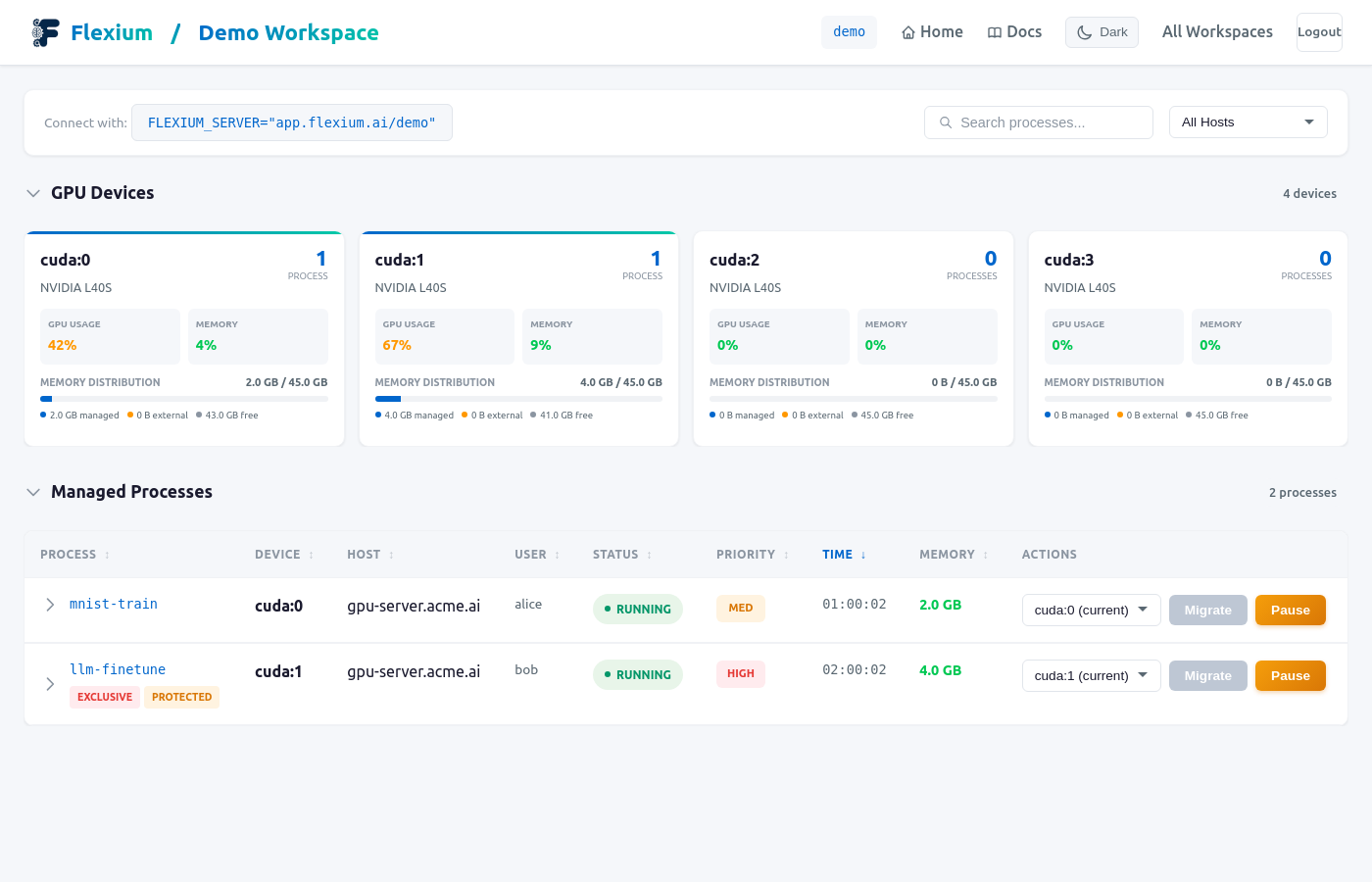
Monitor & Migrate: Via web dashboard at app.flexium.ai
- See all running training jobs
- One-click migration between GPUs
- Pause and resume training
Live Migration Demo:
Architecture Overview
┌───────────────────────────────────────────────────────────┐
│                      YOUR GPU MACHINE                     │
│                                                           │
│  ┌─────────────────────────────────────────────────────┐  │
│  │                  Training Process                   │  │
│  │  - Your PyTorch training code                       │  │
│  │  - Initialized with flexium.init()                  │  │
│  └─────────────────────────────────────────────────────┘  │
│                                                           │
│  ┌─────────┐  ┌─────────┐  ┌─────────┐  ┌─────────┐       │
│  │  GPU 0  │  │  GPU 1  │  │  GPU 2  │  │  GPU 3  │       │
│  └─────────┘  └─────────┘  └─────────┘  └─────────┘       │
└───────────────────────────────────────────────────────────┘
                            │
                            │ Communicates with
                            ▼
┌───────────────────────────────────────────────────────────┐
│                 FLEXIUM CLOUD (flexium.ai)                │
│                                                           │
│         Web dashboard for monitoring and control          │
└───────────────────────────────────────────────────────────┘
Use Cases
Dynamic GPU Allocation
Move training jobs between GPUs based on demand via the dashboard:
- Open your workspace at app.flexium.ai
- Find the job you want to move
- Click "Migrate" and select the target GPU
Memory Management
Free up a GPU for a larger model:
- Find the smaller job in the dashboard
- Migrate it to another GPU
- Your original GPU now has more free memory
Fault Tolerance
If a GPU has issues, migrate affected jobs via dashboard - select each job and move to a healthy GPU.
Development Workflow
Test on GPU 0, then move to production GPU:
- Start training:
python train.py(runs on cuda:0) - Open dashboard at app.flexium.ai
- Click "Migrate" to move to production GPU without stopping
Why Flexium?
-
Zero VRAM Residue
Unlike
model.to(device), migration guarantees 100% memory is freed. Flexium's architecture ensures complete GPU release. -
GPU Error Recovery
GPU errors (OOM, device assert, ECC) can be recovered automatically. Use
recoverable()to enable auto-migration and retry on errors. -
Works Offline
If connection to Flexium is lost, your training keeps running. It reconnects automatically when the server is back.
-
Real-Time Dashboard
Monitor all training jobs, GPU utilization, and memory usage. One-click migration between devices.
-
Minimal Code Changes
Just 2 lines of code to enable. No changes to your training logic, model, or dataloader.
-
GPU Error Recovery
OOM, ECC errors, device asserts — automatically recover by migrating to a healthy GPU and retrying.
Documentation
| Document | Description |
|---|---|
| Getting Started | Quick start guide |
| Installation | Detailed installation guide |
| Architecture | How flexium works |
| API Reference | Complete API documentation |
| Examples | Code examples |
| Troubleshooting | Common issues and solutions |
Feature Documentation
| Feature | Description |
|---|---|
| Zero-Residue Migration | Driver-level migration with zero VRAM residue |
| GPU Error Recovery | Automatic recovery from OOM, ECC, and other GPU errors |
| Pause/Resume | Pause training to free GPU, resume later |
| Works Offline | Training continues even if server connection is lost |
| Framework Compatibility | Works with PyTorch Lightning, Hugging Face, timm, and more |
License
MIT License - see LICENSE for details.
Contributing
Contributions welcome! Please see our GitHub repository to report issues or submit pull requests.